> ## Documentation Index
> Fetch the complete documentation index at: https://docs.pocketbyte.co/llms.txt
> Use this file to discover all available pages before exploring further.
# Meet Pocketbyte
> Learn what it is, who it's for, and how to get building.
These docs are incomplete. I am actively working on them as we speak.
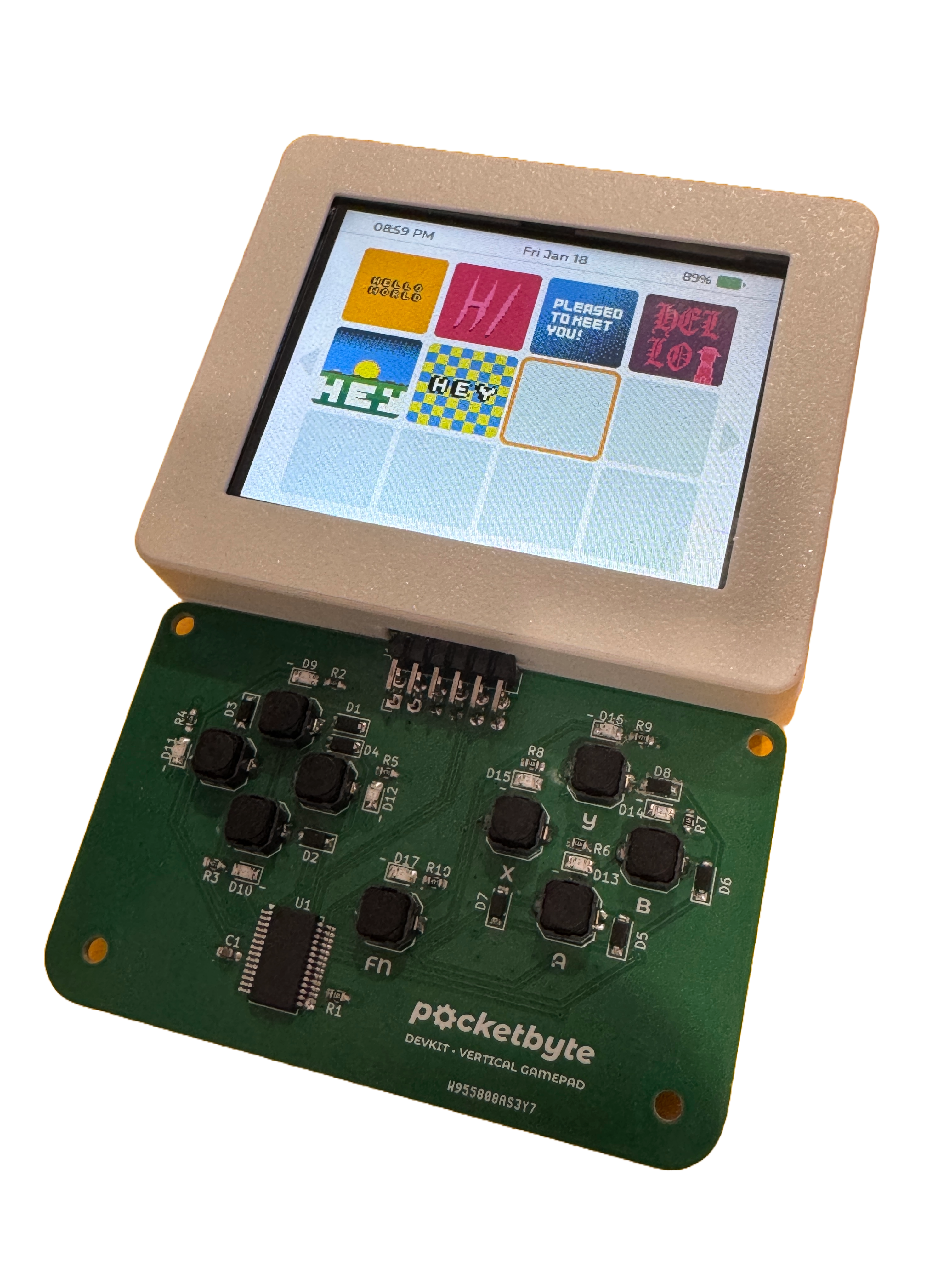 Pocketbyte is a modular handheld indie computer that can be used as a game console, PDA, music player, and much more. You can run apps made by others and build your own. It also has a modular controller port meaning you can swap between gamepads, keyboards, and more.
## Who It's For
Pocketbyte is built for people who want to make things, and also have fun! You'll find it a great fit if you are:
* An **indie game developer** looking for a tangible, portable target platform to create original games on real hardware. No Unity here.
* A **student or self-directed learner** exploring embedded systems, C programming, or game development in a hands-on environment.
* A **maker or engineer** who wants to build interactive devices — not just games, but tools, toys, and experiments — using a purpose-built portable platform.
* A **digital minimalist or tech enthusiast** who wants a cool, playful, multi-functional device for their every day carry. Possibly to play music or write notes.
## What You Can Build
Because Pocketbyte is open-source, your software is only limited by the hardware capabilities and your imagination. Common use cases include:
* **Games** — arcade-style games, puzzle games, platformers, top-down games, turn-based games, or really anything! 3D graphics are also possible thanks to our friends in the UK.
* **Interactive apps** — utilities, graphing calculators, music sequencers, text editors, wireless messaging platforms, or any application that benefits from a small portable form factor.
* **Educational tools** — interactive demos, simulations, or learning aids that you can carry around and share.
## Key Features
Attach different physical input modules to change your control scheme — a d-pad, Blackberry keyboard, or custom layouts — without changing your device.
Write your games and apps in C using the official Pocketbyte library. The API covers display, input, audio, and much more.
The Pocketbyte library is an ESP-IDF managed component. Add it to any IDF project with one command and use the full power of the ESP-IDF ecosystem.
You control the software entirely. There is no locked bootloader, no mandatory storefront — flash whatever you build directly to the device.
Pocketbyte runs on the ESP32-S3, a dual-core Xtensa LX7 microcontroller with Wi-Fi and Bluetooth. All apps are written in C and built using the ESP-IDF framework. Familiarity with C and basic embedded development concepts will help you get the most out of the platform.
## What's in These Docs
These docs are organized to take you from unboxing to building:
Get your toolchain set up and your first app running on the device.
Understand the processor, display, input system, audio, and connectivity.
Step-by-step walkthroughs for common tasks, like building your first game.
Complete documentation for every function in the Pocketbyte C SDK.
Start with the [Quickstart](/quickstart) if you want to get something running right away, or read the [Hardware Overview](/hardware-overview) if you want to understand the platform before you write a single line of code.
Pocketbyte is a modular handheld indie computer that can be used as a game console, PDA, music player, and much more. You can run apps made by others and build your own. It also has a modular controller port meaning you can swap between gamepads, keyboards, and more.
## Who It's For
Pocketbyte is built for people who want to make things, and also have fun! You'll find it a great fit if you are:
* An **indie game developer** looking for a tangible, portable target platform to create original games on real hardware. No Unity here.
* A **student or self-directed learner** exploring embedded systems, C programming, or game development in a hands-on environment.
* A **maker or engineer** who wants to build interactive devices — not just games, but tools, toys, and experiments — using a purpose-built portable platform.
* A **digital minimalist or tech enthusiast** who wants a cool, playful, multi-functional device for their every day carry. Possibly to play music or write notes.
## What You Can Build
Because Pocketbyte is open-source, your software is only limited by the hardware capabilities and your imagination. Common use cases include:
* **Games** — arcade-style games, puzzle games, platformers, top-down games, turn-based games, or really anything! 3D graphics are also possible thanks to our friends in the UK.
* **Interactive apps** — utilities, graphing calculators, music sequencers, text editors, wireless messaging platforms, or any application that benefits from a small portable form factor.
* **Educational tools** — interactive demos, simulations, or learning aids that you can carry around and share.
## Key Features
Attach different physical input modules to change your control scheme — a d-pad, Blackberry keyboard, or custom layouts — without changing your device.
Write your games and apps in C using the official Pocketbyte library. The API covers display, input, audio, and much more.
The Pocketbyte library is an ESP-IDF managed component. Add it to any IDF project with one command and use the full power of the ESP-IDF ecosystem.
You control the software entirely. There is no locked bootloader, no mandatory storefront — flash whatever you build directly to the device.
Pocketbyte runs on the ESP32-S3, a dual-core Xtensa LX7 microcontroller with Wi-Fi and Bluetooth. All apps are written in C and built using the ESP-IDF framework. Familiarity with C and basic embedded development concepts will help you get the most out of the platform.
## What's in These Docs
These docs are organized to take you from unboxing to building:
Get your toolchain set up and your first app running on the device.
Understand the processor, display, input system, audio, and connectivity.
Step-by-step walkthroughs for common tasks, like building your first game.
Complete documentation for every function in the Pocketbyte C SDK.
Start with the [Quickstart](/quickstart) if you want to get something running right away, or read the [Hardware Overview](/hardware-overview) if you want to understand the platform before you write a single line of code.